Contents
Welcome to Handle Marketplace. This will be a brief tutorial on how to create a policy and add assets. To begin, click the “Onboard Now” button. Take a moment to read the onboarding instructions and pay attention to the recommendations. Also, take note of the fee structure. Be aware that fees will be included during the initial mint. Once you have agreed to the terms, click the “Choose a Handle and Continue” button and select your handle.
We’ll start with the Collection Info.
"When creating a collection, we recommend creating a brand new wallet and minting a new handle. The wallet should not be used anywhere else other than creating your collection and backgrounds"
To create your collection navigate to https://marketplace.handle.me/backgrounds/onboarding
- Your payment address will be where payments are sent. This can be changed in the future.
- The Collection Name is what will display in the handle.me marketplace. This can also be changed in the future.
- Collection image can either be a link or you can upload an image. Uploading will create an IPFS link and will display once uploaded.
- Royalty Address and Royalty percentage are how much and where you want secondary market royalties to be sent. This CANNOT be changed in the future, so take some time and think carefully about what you want for the address and percentage.
- The Add Policy ID button is used to add additional PFP policies that will be included in the PFP area of the handle.me Marketplace.
- The NSFW option lets us know if your collection is safe for work. Remember that this is for the entire policy and cannot be updated on a per-background basis.
Once you have filled out the form, click the “Save Collection” button. This will prompt you to sign a transaction which adds the necessary datum to your handle. Once verified on-chain, you’ll notice the UI will display your Policy ID at the top of the page. Copy this and save it for later. It will come in handy in the future.
When customizing your handle, users have the option to add an NFT as a background. They can do so from the personalization page. NFT Creators can set defaults for the background, which will limit the options a user can select when personalizing their background. This allows for brand or theme consistency for NFTs.
These default styles can apply to the PFP, Text, Background, and QR code areas of the handle. They can even require certain assets to be used in the personalization process. While these creator styles are optional by default, they can be set to mandatory. If the defaults are not forced, then the user will see the option to toggle them off under their Handle preview in personalization.
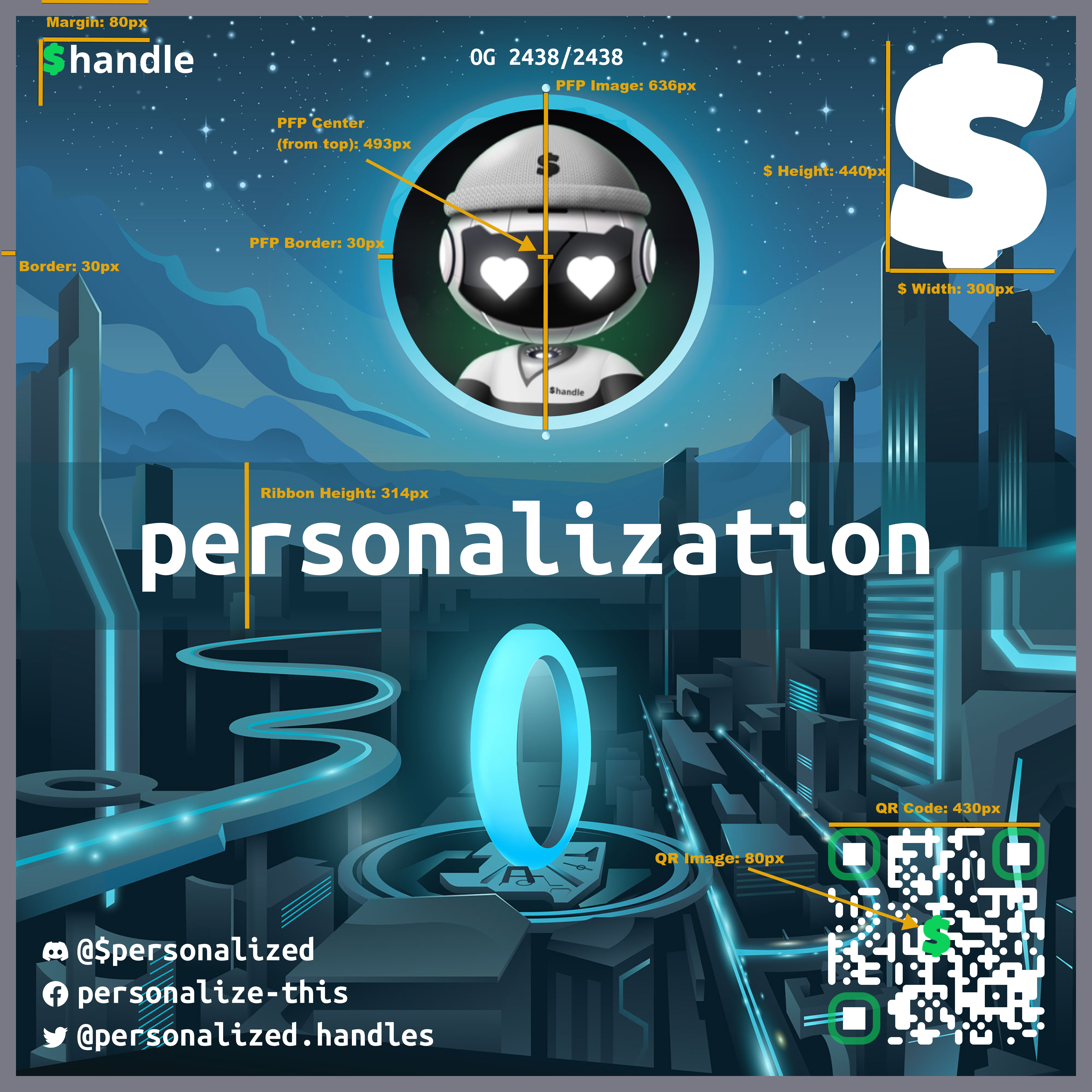
Click to Download Template FIG
Yes! To incentivize Handle owners to use your NFT background, you will be able to customize certain Handle facets that the user can't normally choose. We only ask that the Handles brand is "tastefully preserved" and that we get a chance to give feedback in that regard. Note: This does not stop the user from reverting font and color changes back to their selections as there is a "Use Creator Suggested Settings" toggle in the UI. There is an option to "force_creator_settings" in the background meta(datum) to disable this toggle.
It needs to be a non-ambiguous font. Which means the following characters need to be distinguishable from all of the other characters in the list: 0 O o 1 I i L l J j T t 2 z Z 5 s S 8 B b g q 9
Handles Background Creator Defaults
Yes! If you would like to ensure that a user can only select a background if they also select or own a certain PFP, we will support simple "exact" or "starts with" pattern matching on the asset name (including CIP-67 labels if present) or CNFT attribute matching (i.e. "Outerwear:Denim Jacket"). You can also choose if the PFP must be "displayed" (in the Handle image) or just "owned" (in the wallet). This is done via the "require_pfp..." options in the schema doc above.
Will the user be able to see the options available to them even if they don't have the NFTs in their wallet yet?
Yes! We want the Handle Designer experience to be as creative and inclusive as possible. This means that users will be able to view NFTs from collections even if they don't yet own them so they can fall in love with a specific design. Once they attempt to save the changes on-chain, our UI will communicate the NFTs that still need to be purchased and will pause the transaction until the required NFTs are in the wallet.
Yes! Currently, we don't have a built in marketplace, so this will be up to you and the marketplace you choose to sell the backgrounds through. Eventually, we will provide a marketplace specifically for this.
We suggest that NFT partners start with a small set of FT backgrounds either as a limited run or on an open policy. We are also suggesting that NFT partners have "a few" free options (minus minUTxO and tx fees), a few lower-priced options and a few premium options. We will display the price found in the background meta(datum) in the UI.
You can either use your own minting services (we just need a URL), or you can use our smart-contract, handle-bound, CIP-68 (444) minting service.